QR Menu · 3D & AR · 4 Languages · From $49/mo
Don't Just Show a Menu.
Show It in 3D.
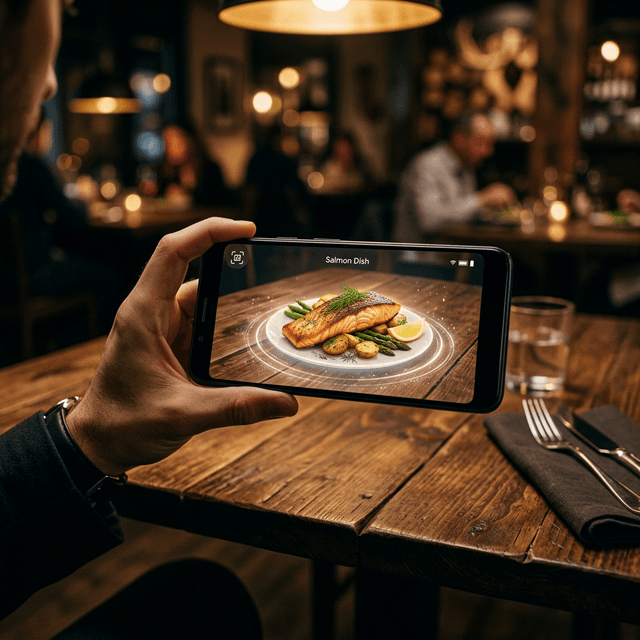
Your menu, beautifully shown in 3D and understood in every language — English, Japanese, Korean or Chinese. Embedded on your own website, or hosted as a complete menu site by Foovii. Set up in days, no hardware needed.
Every dish, in the palm of their hand.
In a world where guests Google everything before they eat it — imagine showing them your signature dish in full 3D, spinning in mid-air, before they even pick up their chopsticks.
This isn't science fiction. Your competitors might already be doing it. Let's make sure you do it better.
3D & AR Menu Experience
Guests can rotate, zoom, and virtually place dishes on their table using their phone camera — before they order. The iPhone & Android AR viewer works without any app download.
Speaks Your Guest's Language
Foovii automatically detects the device language and switches the menu to English, Japanese, Korean, or Chinese. No guest left behind — especially inbound tourists.
On Your Own Website
Already have a website? Embed your 3D multilingual menu directly into it — your brand, your domain, one line of code. Guests never leave your site.
Or Get a Website Included
No website? No problem. Foovii hosts a beautiful menu site for your venue — your logo, your own domain, live within days. Fully managed, from $99/month.
From menu upload to go-live,
in days — not weeks.
We do the heavy lifting: data entry, 3D production, translation. You just send us your menu and pick where it lives.
Upload your menu
Send us your existing menu — photos, prices, descriptions, anything. Our team sets up your digital menu with your branding in place.
We handle the data entry for you.
We build the 3D models
Your signature dishes become photorealistic 3D models, ready for guests to rotate, zoom, and view in AR. The first 3 dishes are free on every plan.
Additional models from $50 each. IP stays with Foovii.
Every language, automatic
The menu is translated into English, Japanese, Korean, and Chinese. Each guest's phone shows the menu in their own language automatically.
English · 日本語 · 한국어 · 中文
Go live — embedded or hosted
Have a website? We give you one line of code to embed the menu on your site. No website? We host a complete menu site with your logo and your own domain.
Your brand. Your domain. Your choice.
Guests explore in 3D & AR
Guests scan the QR code or visit your site, then tap a dish to see it in photorealistic 3D — or place it in AR directly on their table using the phone camera.
USDZ for iOS, GLB for Android. Auto-detected.
Add ordering when you're ready
Turn the menu into a full ordering system whenever you like: guests order from their phone, orders fire straight to your Kitchen Display, and your manager sees live sales.
Optional add-on — +$100/month, add anytime.
Embed
For venues with their own website. Your 3D multilingual menu embedded on your site — your brand, your domain. First 3D models free.
Website
No website? We host your menu site with your logo and your own domain. Everything in Embed, fully managed — the complete package.
+ Ordering
Add table ordering, Kitchen Display and a manager dashboard whenever you're ready. Add anytime, no lock-in.
Your guests deserve
better than a paper menu.
No hardware to buy. No 12-month contracts. Just your restaurant, elevated — from day one.